The point in one paragraph
Most glasses-free 3D displays force each exhibition kiosk to carry a Windows workstation with a certified NVIDIA GPU, because the display’s stereoscopic pipeline runs on the host. When the pipeline moves into an integrated FPGA inside the display, the host’s job collapses to “output a side-by-side 3D video stream.” At that point a kiosk can be driven by a mini-PC, an Intel N100 box, a Raspberry Pi 5, or an ARM-based single-board computer. For museums, trade shows, retail, and pop-up exhibitions, that single architectural change is what turns a multi-station 3D gallery from a fleet of workstations into a fleet of embedded hosts.
Why the host matters in an exhibition
An exhibition kiosk is not a workstation that happens to be on a plinth. It is part of the architecture of the room. Its weight, heat, fan noise, and OS-update schedule all reach the visitor in some form. A workstation class host forces design choices that a small embedded host does not:
- Heat and ventilation. A workstation under sustained 3D pipeline load exhausts warm air that has to go somewhere. Enclosed plinths and glass vitrines start to feel like server closets.
- Acoustic footprint. Cooling fans are audible. In a quiet gallery, a library reading room, or a museum lobby, ten workstations means ten fans.
- Power budget. A workstation-class host draws two to four hundred watts. A mini-PC draws under twenty-five. At ten stations, the per-room power and thermal load is materially different.
- Maintenance window. Workstation operating systems update themselves. Embedded Linux hosts do not, unless someone chooses to.
- Procurement cycle. Workstations need replacement on a longer cycle, but each replacement is heavy. Embedded hosts can be replaced almost like light bulbs.
None of these are exotic constraints. They are the constraints exhibition designers and AV integrators work around every day.
The architecture in one diagram
The structural difference between the two kiosk models is a single line: where the stereoscopic pipeline runs. On a software-driven kiosk, the host runs eye tracking, stereoscopic pixel routing, and sub-pixel rearrangement in software. On a 3DV-style kiosk, all of that lives on an integrated FPGA inside the display; the host only outputs a standard side-by-side (SBS) video stream.
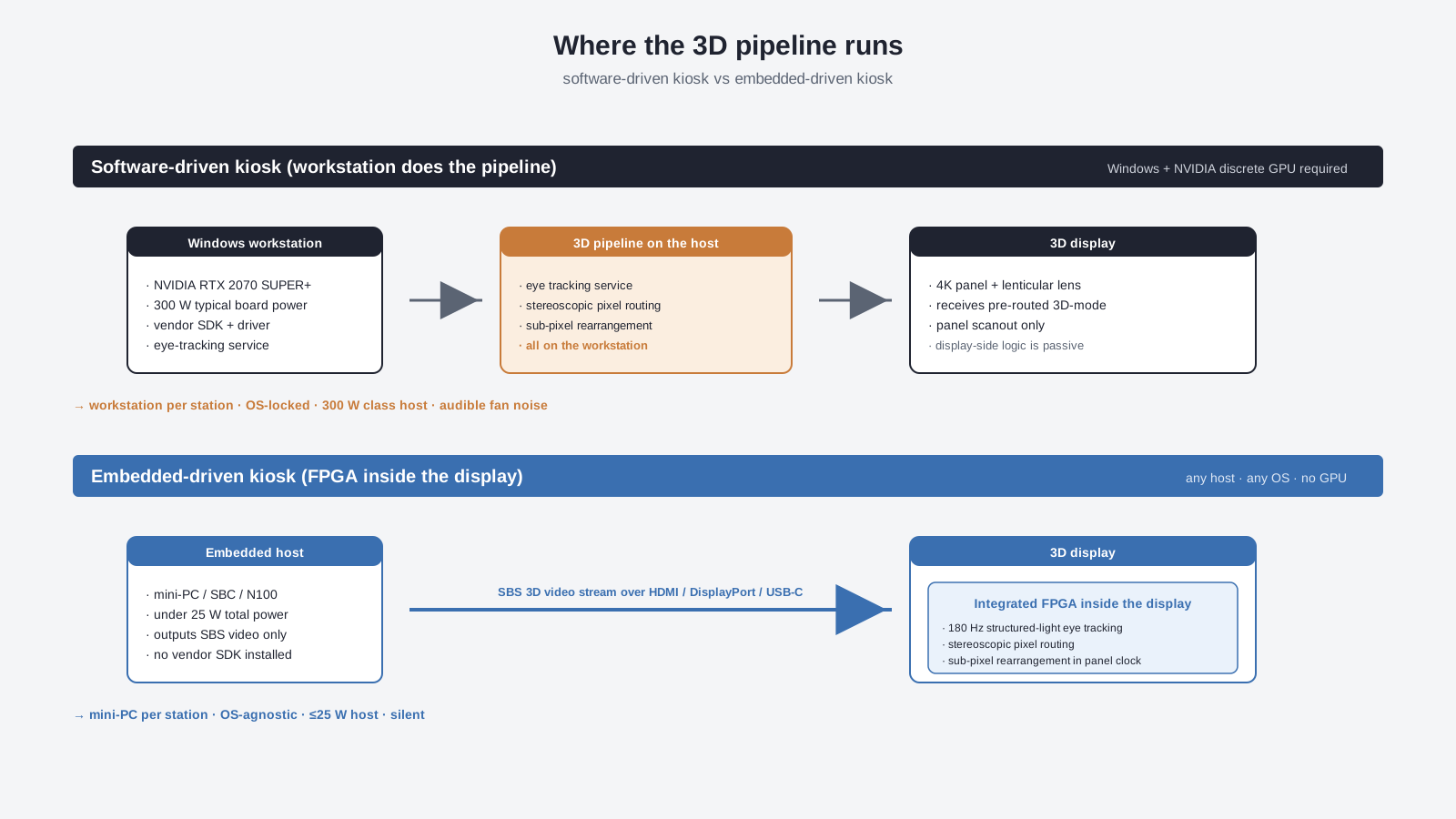
The reason the host changes is that the pipeline location changes. The optical element does not.
What each kiosk actually contains
Stripping the two kiosk models down to their bills of materials shows what the architecture change actually buys on the floor.
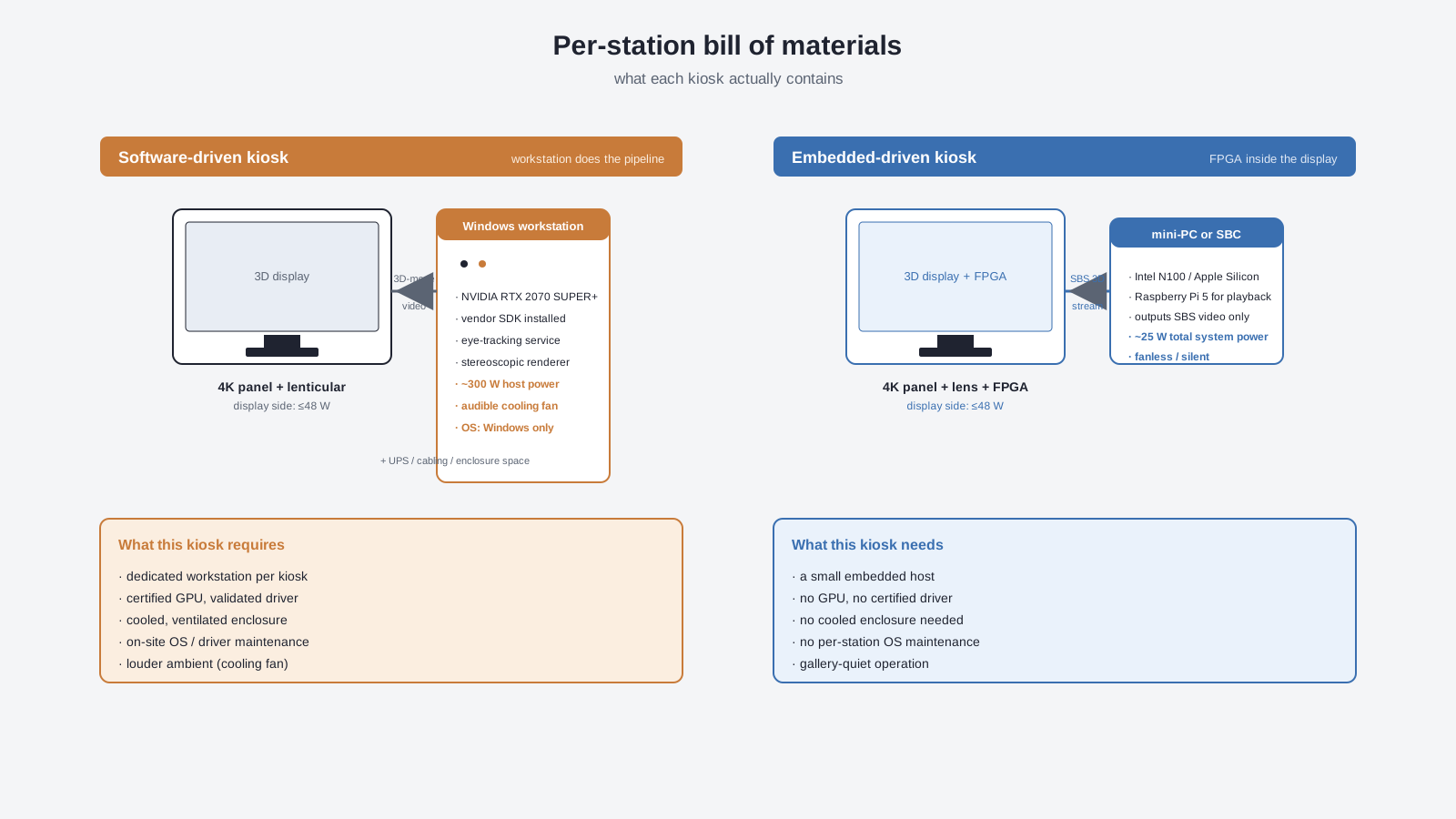
The workstation kiosk is more than a screen and a small computer. It is a screen, a workstation tower with a discrete GPU, a vendor runtime, an OS license, a calibration service, a power supply with adequate headroom, and usually a UPS. None of those are bad. They are just a lot to put behind a single exhibit.
The embedded kiosk is a screen, a small host, an HDMI / DisplayPort / USB-C cable, and the FPGA that already lives in the panel. The host can sit behind the display, in a locked cabinet under the plinth, or in a rack 30 meters away, as long as the cable run is reasonable.
What becomes possible in a multi-station gallery
For a single station, the workstation is manageable. For ten stations, the differences compound.
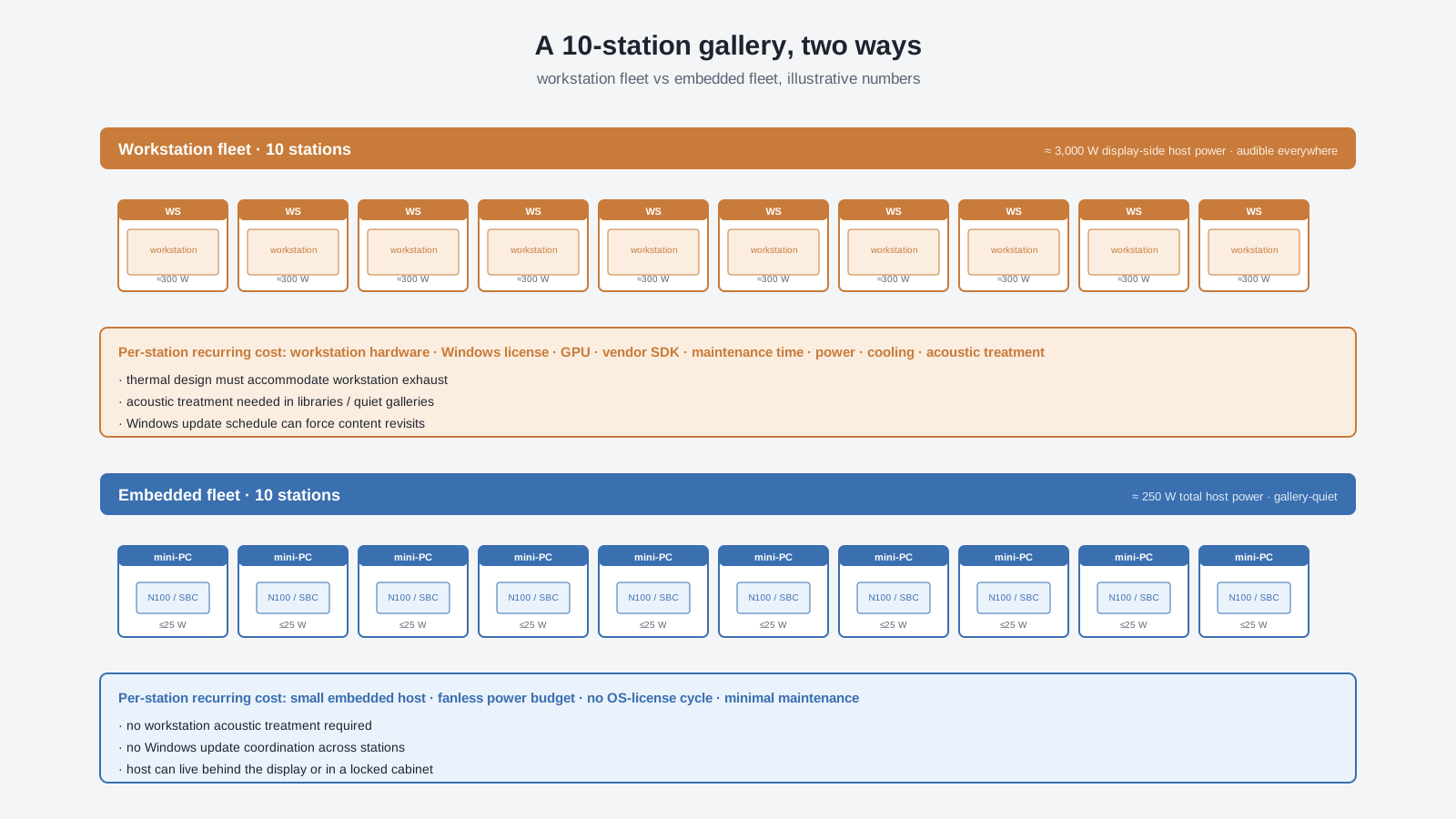
Three changes show up the moment the second station goes in:
- Acoustic budget disappears. A gallery with embedded hosts is genuinely gallery-quiet. There is no fan noise to design around.
- OS update coordination is gone. Workstations update on their own schedule. Embedded hosts run the same image, on the same cadence, and do not surprise the curator with a reboot during visiting hours.
- Single-curator maintenance is realistic. A small embedded host can be swapped in minutes. A workstation swap is a project.
None of this is theoretical for an exhibition context. It is what determines whether the gallery runs from opening to closing without an AV technician on site.
What the visitor experience actually picks up
Visitors do not read architecture diagrams. They pick up the room.
- They notice when the kiosk is loud.
- They notice when the kiosk vents hot air onto the plinth surface.
- They notice when a curator disappears into a service corridor to reboot a station.
- They do not notice what is inside the panel, what the host is, or whether the GPU is integrated or discrete.
Embedded-driven kiosks let the visible part of the installation be the screen, the lens, the content, and the visitor. The invisible part — the host — disappears into the building’s wiring closet or behind a service panel.
Where embedded-driven kiosks are still the wrong fit
The architecture choice is not always in favour of the embedded host. There are real cases where the workstation is the right answer.
- Real-time, GPU-bound scenes. If the content is a ray-traced scene, a live volumetric medical visualisation, or a high-density particle simulation, the application itself still wants a capable GPU. The display can be FPGA-driven, but the source content cannot be rendered on a mini-PC.
- Frequent live content swaps. If curators and designers are editing the SBS content on the floor and pushing it to the kiosk throughout the day, the editing workstation is a separate host. The kiosk itself can still be embedded, but the editing host may need to be a workstation.
- Multi-display wall arrangements. If a single exhibit stitches multiple 3DV displays into a wall, each panel still needs its own SBS feed. A single mini-PC feeding three or four panels at full SBS resolution is usually fine; ten panels per workstation is not.
- Custom OS-level integrations. If the kiosk has to expose custom hardware (sensors, RFID readers, environmental triggers), the integration layer may need a full OS. This is less common but real.
In each of these cases, the constraint is the content or the integration, not the display.
Deciding between workstation and embedded for a given exhibit
A short decision tree is more useful here than a checklist. It maps the two questions that actually matter — where the content comes from, and how often it changes — to the host choice.
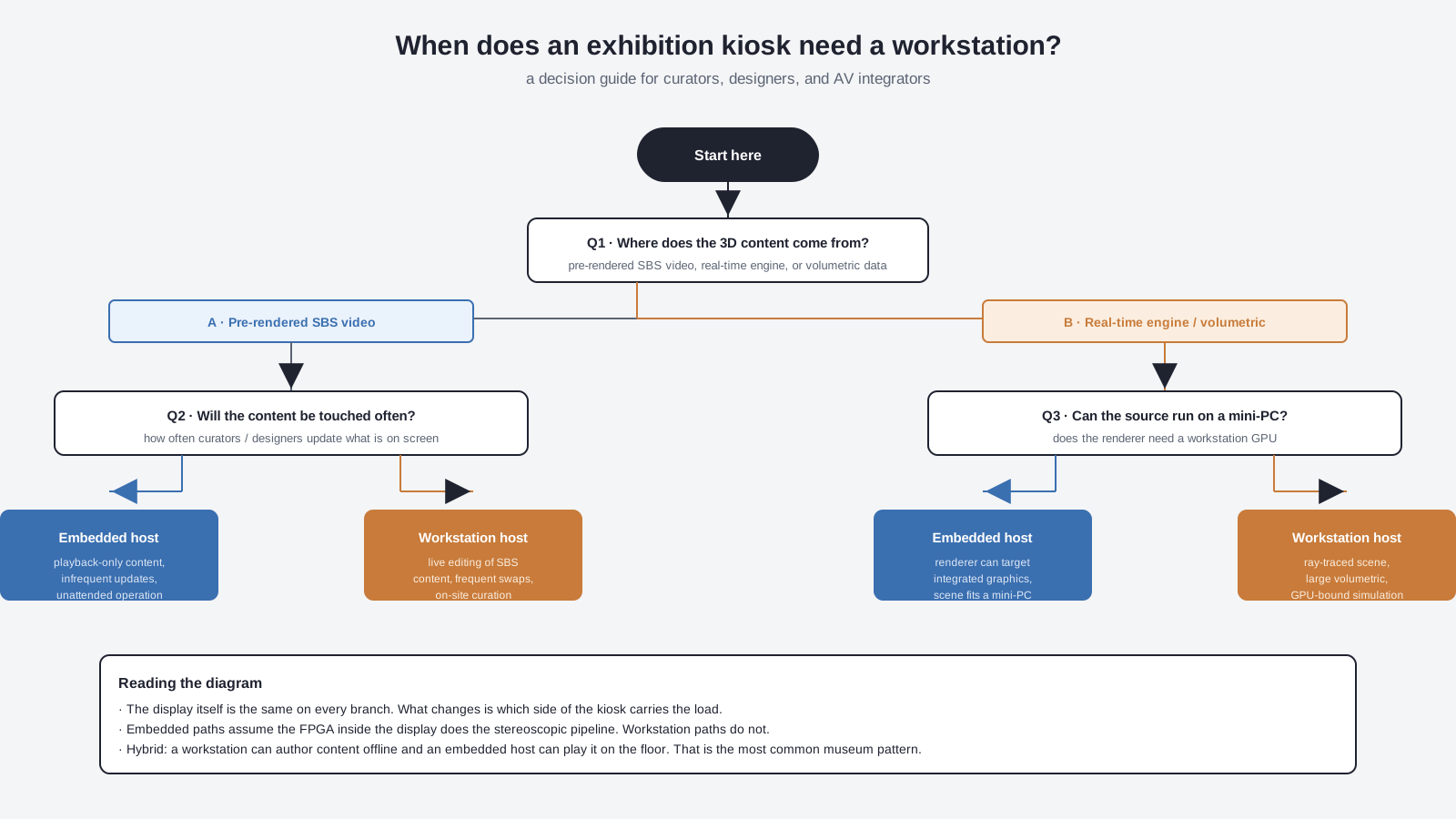
The decision tree collapses to one practical question for most curators: is the content authored once and replayed, or is it authored live on the floor? For the first case, the embedded host wins on every dimension that exhibition teams care about — noise, heat, weight, maintenance, OS cycle. For the second case, the workstation is the right host, but it usually lives in a back room, not in the kiosk itself.
Practical questions to ask before specifying
For an exhibition team putting a 3D display on the floor, the questions that actually determine the host choice are:
- Where does the SBS content come from? Pre-rendered SBS video file, real-time engine, or volumetric data?
- How often will the content change? Once per exhibit run, weekly, daily, or live on the floor?
- Where will the host physically live? Behind the panel, under the plinth, in the plinth, or in a service room?
- What is the acoustic envelope of the room? Library-quiet, gallery-quiet, or retail/lobby loud enough that a fan is irrelevant?
- What is the power budget per station? Some venues cap station power at 100 W or less; workstation hosts blow past that immediately.
- How is OS maintenance handled? One AV tech across the entire venue, or none at all?
If the answers point at “pre-rendered, infrequent updates, behind the panel, gallery-quiet, low power, single tech,” an embedded host is the right answer. If any of those answers point the other way, the workstation — or a hybrid setup — may still be the better choice.
Common questions from exhibition teams
Does an embedded host actually work for SBS playback?
For pre-rendered SBS video and most interactive SBS content, yes. The host just outputs a standard 3840 x 2160 video stream. That is within reach of every embedded GPU listed above. Real-time, GPU-bound scenes are a separate case.
Can the host live away from the display?
Yes, within cable-length limits. A 15 m HDMI run is fine for SBS at 60 Hz. A 30 m run is achievable with active cables or fibre extenders. Beyond that, the display should sit closer to the host.
What about interactive exhibits?
A touchscreen kiosk that needs to respond to taps is still an embedded-friendly pattern. The host handles input, the FPGA inside the display handles the 3D pipeline. The two are decoupled.
Does an embedded host save on power?
Yes. A mini-PC at 25 W versus a workstation host at 300 W is a 12x reduction per station. At ten stations, that is a different power-budget conversation with the venue.
Does an embedded host change the lifespan of the kiosk?
Embedded hosts typically have longer mean time between failures because they have no moving parts. Workstation GPUs have fans and moving parts. In an unattended kiosk, the embedded host is usually the more reliable component over a five-year run.
What about Linux on the embedded host?
For pre-rendered SBS playback, Linux on a mini-PC or a Raspberry Pi 5 is a well-trodden path. The display itself is OS-agnostic, so the host can run whatever OS the AV team prefers — see why most glasses-free 3D displays cannot work on a Mac for the cross-OS reasoning.
Is this only useful for big installations?
No. Even a single-station kiosk benefits from a smaller, quieter, cooler host. The difference is just more dramatic at ten stations than at one.
Where to read next
- Why an integrated FPGA gives 3DV spatial displays a practical edge — the architecture decision that makes the embedded host viable.
- Why your glasses-free 3D display doesn’t need a high-end GPU — the GPU requirement story, including which hosts actually work.
- Why most glasses-free 3D spatial monitors cannot work on a Mac — OS-agnosticism as a consequence of the FPGA pipeline.
- Lenticular lens vs. integrated FPGA — the architectural comparison behind the deployment difference.
- How SBS produces a glasses-free 3D image — what the host actually has to deliver.
Leave a Reply